 Buy me a Koffee
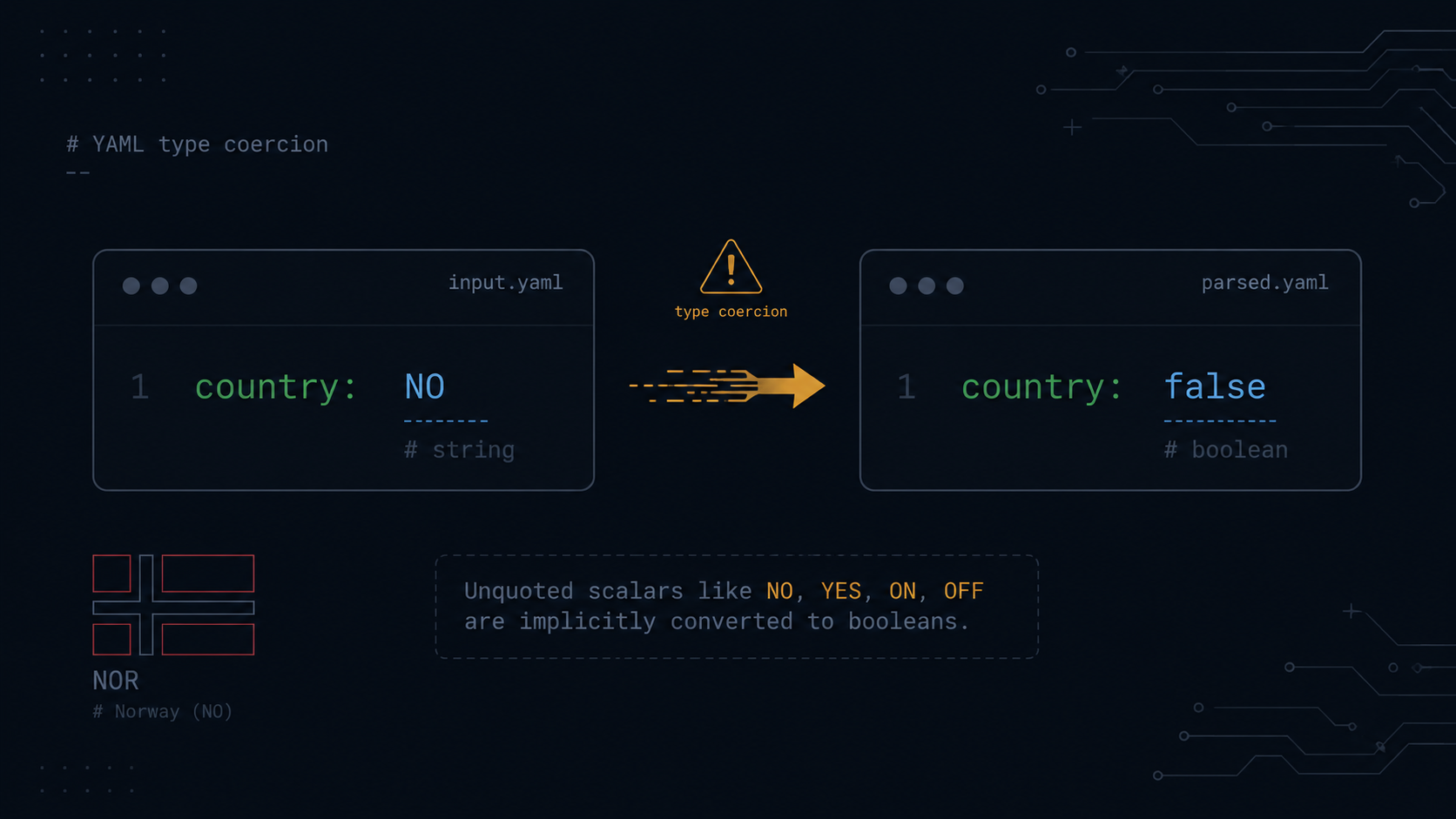
The YAML Norway Problem and Other Implicit Type Coercions That Break Kubernetes Manifests
YAML’s pitch is that it’s more human friendly than JSON. Fewer quotes, fewer braces, just write the value. The cost of that friendliness is that YAML parsers have to guess what type you meant when you don’t say, and YAML 1.1’s guesses include some genuinely surprising ones.
The most famous example has a name.
The Norway problem is when YAML 1.1 interprets the country code NO as the boolean false instead of as the string NO.
If you’re building a list of country codes such as NO, SE, DK, and FI, and your YAML parser follows the 1.1 spec, NO doesn’t come out as the string “NO”. It comes out as the boolean false. Norway, as a country code, becomes “false.” This isn’t a contrived example. It has happened in real configuration files, and it passes YAML syntax validation cleanly because false is a perfectly valid YAML value. The bug is semantic, not syntactic, which is exactly why linters tend to miss it.
This is bigger than Norway
The Norway problem is the most quotable instance of a broader category. YAML’s implicit typing rules will silently reinterpret unquoted strings as booleans, numbers, nulls, or dates based on what the string looks like, not what you meant.
YAML’s implicit type coercion, indentation sensitivity, and security implications mean you have to approach it with awareness. Quote strings that could be misinterpreted, always use safe loading functions, validate your YAML before deploying it, and understand whether your parser follows YAML 1.1 or 1.2 rules.
Here’s the table of values that silently become something else if left unquoted.
| You write | You meant | YAML 1.1 parses it as |
|---|---|---|
| NO, YES, ON, OFF, TRUE, FALSE, Y, N | strings | booleans |
| 1.10 | the string “1.10”, a version number | the float 1.1 |
| 0123 | the string “0123”, a zip code or account number | the integer 83, parsed as octal |
| 2024-01-15 | the string “2024-01-15” | a date or timestamp object |
| null, ~, Null, NULL | the literal string | null |
Each of these looks fine in a code review. None of them throw an error. All of them produce a different type in your application than the string you typed.
Where this actually bites: Helm values and feature flags
Version strings. A Helm values.yaml file with:
appVersion: 1.10If your application reads this expecting a string like “1.10,” where the .10 is meaningful and isn’t the same as 1.1 rounded, a YAML 1.1 parser may hand your code the float 1.1 instead. The trailing zero, the part that distinguishes version 1.10 from version 1.1, is gone, because floats don’t preserve trailing zeros. This is a real, reported class of bug in config driven version pinning.
Feature flags using yes, no, on, and off. Someone writes:
featureFlags:
  newCheckout: yes
  betaSearch: no
intending these as readable synonyms for true and false, which, to be fair, is how YAML 1.1 treats them. This one actually works in the sense that you get booleans. The trap is the inconsistency. If a different key in the same file is a country code, a region identifier, or anything that happens to collide with yes, no, on, off, y, or n case insensitively, it gets the same boolean treatment, silently, and only for that one value.
Leading zeros in identifiers. Port numbers, zip codes, account numbers, and any identifier that might start with zero fall into the octal trap.
config:
  legacyPort: 0123
A YAML 1.1 parser sees a number starting with zero and may interpret the whole thing in octal, so 0123 becomes 83 in decimal. If legacyPort was meant to be compared against a string or used as the literal numeric value 123, your application now has 83 instead, with no error anywhere in the pipeline.
YAML 1.1 versus YAML 1.2, and why “it works in my test” happens
This category of bug has a frustrating extra dimension. Not all parsers agree on the rules, because YAML 1.2 narrowed the implicit typing rules considerably compared to 1.1. For example, 1.2 only treats true, false, and null, along with a few close variants, as booleans or null, dropping most of the yes, no, on, off, y, and n forms.
The parsers Kubernetes adjacent tooling actually uses don’t all agree with each other.
PyYAML, widely used in Python tooling, defaults to YAML 1.1 behavior, so NO, yes, off and similar values all get coerced.
go-yaml, used by kubectl, Helm, and most of the Kubernetes ecosystem, has its own interpretation, closer to 1.1 for booleans but with some differences.
js-yaml, used by many Node.js based tools and GitHub Actions adjacent tooling, defaults to YAML 1.2 style behavior in recent versions, which is stricter and recognizes fewer implicit boolean strings.
The practical consequence is that a YAML file which round trips correctly through a Python script using PyYAML and 1.1 rules might produce a different value when consumed by kubectl apply using go-yaml, or by a Node based CI step using js-yaml. “It worked when I tested it” and “it broke in CI” can both be true for the same file, because the test and the CI step used different parsers with different typing rules, and the YAML itself never changed.
The fix: quote anything that isn’t unambiguously the type you want
The universal mitigation is unglamorous. Quote strings that could be misread. Wrapping “NO,” “1.10,” “0123,” or “yes,” if you mean the string and not the boolean, in quotes removes all ambiguity, because YAML never applies implicit typing to quoted scalars. The cost is a few extra characters. The benefit is that the value means the same thing regardless of which parser, which spec version, or which downstream tool reads it.
For values that genuinely should be booleans, prefer the YAML 1.2 safe spellings, true and false, lowercase and nothing else, since these are recognized consistently across both spec versions and avoid relying on the looser 1.1 synonym list at all.
Catching this before it reaches kubectl apply
One practical workflow: if you’re hand writing a Helm values file or a ConfigMap and you’re not sure whether a value will round trip cleanly, convert it through JSON first. JSON has no implicit type coercion. A JSON string is always a string and a JSON number is always a number, so there’s no NO becomes false ambiguity to begin with. If you write your config as JSON and then convert to YAML, every value’s type is explicit by construction, and the conversion will quote anything that needs quoting to preserve its type.
The JSON to YAML Converter on opsbash does exactly this conversion in your browser. Paste JSON, get YAML with types preserved, including quoting ambiguous looking strings like “NO” or “1.10” so they survive the trip through whichever parser reads them next. It’s also useful in reverse. If you’ve inherited a YAML file and want to check what types its values actually resolve to, converting it to JSON will show you the resolved types directly, so you’re not left guessing whether that NO in the country list is a string or a boolean until it’s already in production.
Try it yourself → JSON↔YAML Converter, which lets you convert between JSON and YAML with types preserved so strings stay strings and NO never becomes false.