 Buy me a Koffee
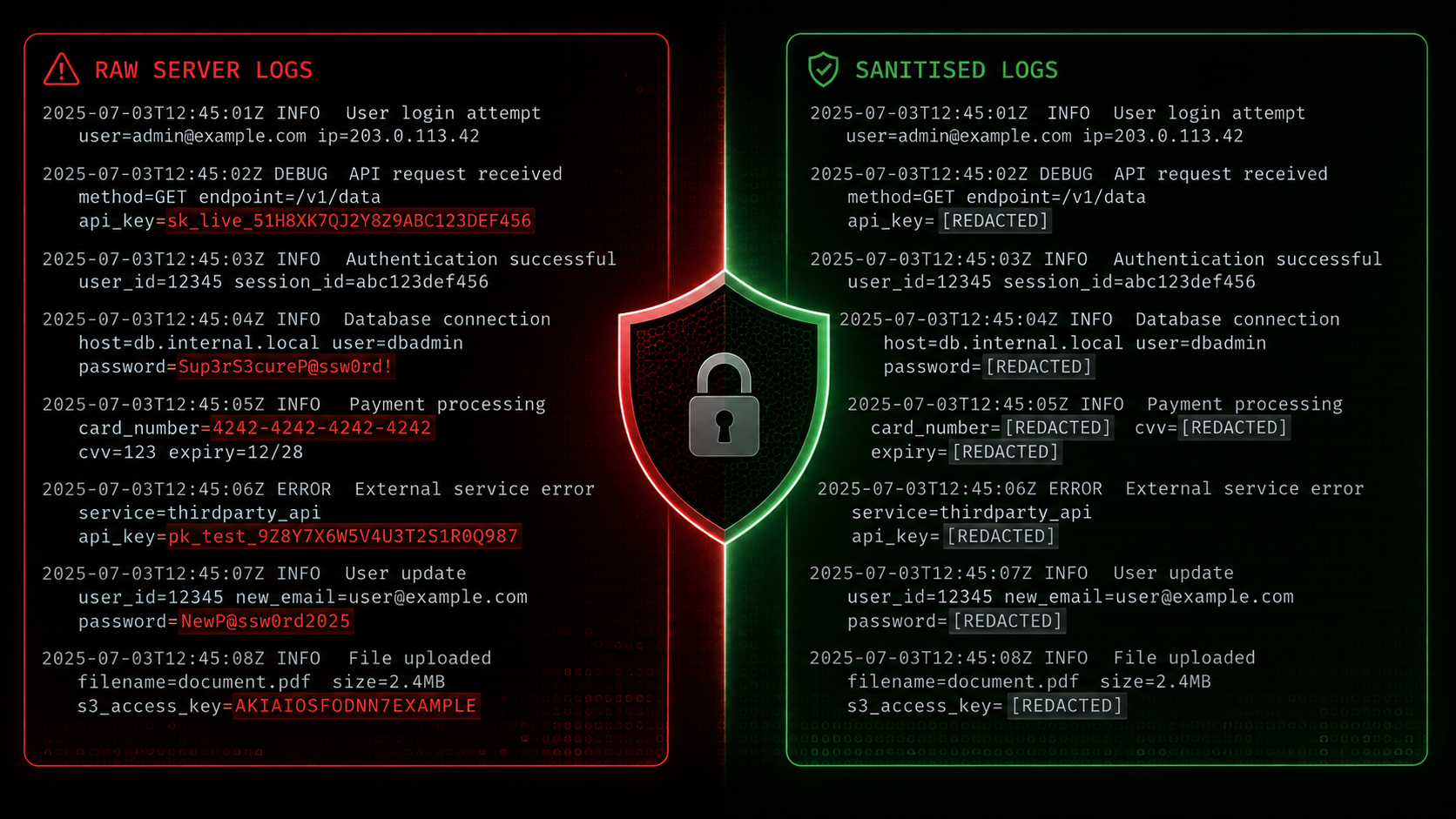
The debugging workflow has changed. A few years ago when something broke in production you opened a terminal, tailed logs, and worked through the problem yourself or posted a sanitised snippet on Stack Overflow. Today most developers open ChatGPT or Claude, paste the error output, and ask what is wrong.
This is genuinely faster and often more useful than Stack Overflow for complex errors. But it has introduced a security problem that most teams have not fully addressed yet.
What Developers Are Accidentally Pasting Into AI Tools
Log output in real applications is not clean. It contains the information your system needs to operate, which often includes the information an attacker needs to compromise it.
A typical error log from a Node.js application connecting to a database might contain the full connection string including username and password. An AWS Lambda error trace might contain environment variable values including API keys. A Kubernetes pod log during a failed startup might print every environment variable the container received, including secrets mounted from Kubernetes Secret objects.
When you paste that log into ChatGPT you are sending it to OpenAI’s servers. OpenAI’s default settings include using conversations to improve their models unless you opt out. Even with opt-out enabled, the data has left your network, traveled over the internet, and been processed by a third-party system you do not control.
For a personal project this is a minor concern. For anything involving customer data, financial information, or credentials to production systems, this is a compliance and security problem.
The Types of Sensitive Data That Appear in Logs
Understanding what to look for makes sanitisation faster and more reliable.
API keys and tokens appear in logs when authentication libraries log request headers for debugging, when a key is passed as a query parameter and your access log captures the full URL, or when an application logs its own configuration on startup. AWS access keys follow a recognisable pattern starting with AKIA followed by 16 characters. Stripe keys start with sk-live or sk-test. OpenAI keys start with sk-. These are easy to detect automatically.
Database connection strings appear when an application fails to connect and logs the error including the connection string it tried to use. A PostgreSQL connection string contains the username and password in plaintext: postgres://username:password@hostname:5432/database.
JWT tokens appear in logs when authentication middleware logs incoming request headers. A JWT is three base64 sections separated by dots. The middle section is the payload which contains user identity information, permissions, and sometimes email addresses or other PII.
IP addresses in logs are often considered PII under GDPR and similar regulations, particularly when they can be linked to individual users. Every web server access log contains IP addresses by default.
Email addresses appear in logs during user authentication flows, password reset flows, and any business process that operates on user accounts.
Why Your Company’s Policy Probably Already Forbids This
Most organisations that have a formal information security policy have a clause about not transmitting company data to third-party systems without approval. AI assistants almost universally count as unapproved third-party systems under these policies because they were not evaluated by the security team when the policy was written and may not have been evaluated since.
The gap is that the policy exists but the workflow has changed. Three years ago nobody was pasting production logs into a chat interface. Today it is a default reflex for many developers. The policy has not been updated to reflect the new behaviour, and the behaviour has not been updated to reflect the policy.
The practical result is that developers are routinely doing something their employment contract and company security policy forbid, usually without realising it.
How to Sanitise Logs Before Sharing Them
The goal of sanitisation is to remove or replace sensitive values while preserving the structure and context that makes the log useful for debugging. A log with all sensitive values replaced by descriptive placeholders like [REDACTED-API-KEY] or [REDACTED-DATABASE-URL] is just as useful for diagnosing an error as the original. The AI assistant does not need your actual password to tell you why your database connection is failing.
Manual sanitisation works but is slow and error-prone. You read through the log, identify sensitive-looking values, and replace them by hand. You will miss things, especially in long log files or unfamiliar codebases.
Automated sanitisation using regex patterns is faster and more consistent. Common patterns for AWS keys, JWTs, email addresses, IP addresses, and database connection strings are well-established and catch the vast majority of sensitive data that appears in typical application logs.
The OpsBash Log Sanitiser runs entirely in your browser. You paste your raw log output, it automatically detects and replaces sensitive values across ten categories including AWS credentials, JWT tokens, API keys, database connection strings, email addresses, IP addresses, credit card numbers, and private key blocks. Everything happens in JavaScript on your own machine. Nothing is sent to any server. You then copy the sanitised output and paste that into ChatGPT or Claude.
The tool also includes an AI prompt helper that inserts your sanitised log directly into a ready-to-use prompt template, so the whole workflow from raw log to AI query takes about thirty seconds.
Building This Into Your Team’s Workflow
Individual habit change is unreliable. A better approach is making sanitisation the path of least resistance rather than an extra step.
One approach is a browser bookmark that opens the sanitiser with one click whenever you are about to paste something into an AI tool. Another is a simple shell alias that pipes command output through a local sanitisation script before printing it. For teams, a shared browser extension or a sanitisation step built into your internal developer tooling makes the secure workflow the default workflow.
The goal is not perfect security. A determined attacker who has compromised your machine can already read your logs directly. The goal is not accidentally sending production credentials to OpenAI during a routine debugging session, which is a much more common and much more preventable event.
Frequently Asked Questions
Does ChatGPT store everything I paste into it?
By default OpenAI uses conversation history to improve their models. You can disable this in Settings under Data Controls, but the data is still transmitted to and processed on OpenAI’s servers regardless of this setting.
What is PII and why does it appear in logs?
PII stands for Personally Identifiable Information. It is any data that can identify a specific individual, including names, email addresses, phone numbers, and IP addresses. It appears in logs because applications process user data and logging libraries capture application state, which includes whatever user data the application is currently handling.
Is the OpsBash Log Sanitiser actually client-side?
Yes. The tool is a static page served from Cloudflare Pages. All processing happens in JavaScript running in your browser tab. You can verify this by disconnecting from the internet after the page loads and confirming the sanitisation still works.
What should I do if I accidentally paste credentials into ChatGPT?
Rotate the affected credentials immediately. Treat them as compromised. Check your access logs for any usage of those credentials that you did not initiate. Report the incident to your security team if your organisation has one.
How do I prevent sensitive data from appearing in logs in the first place?
Configure your logging library to redact sensitive fields by name before writing log entries. Most production logging frameworks support field-level redaction. Never log raw request headers, full connection strings, or environment variable dumps in production. Use structured logging with explicit field names rather than string interpolation so you have precise control over what gets logged.