 Buy me a Koffee
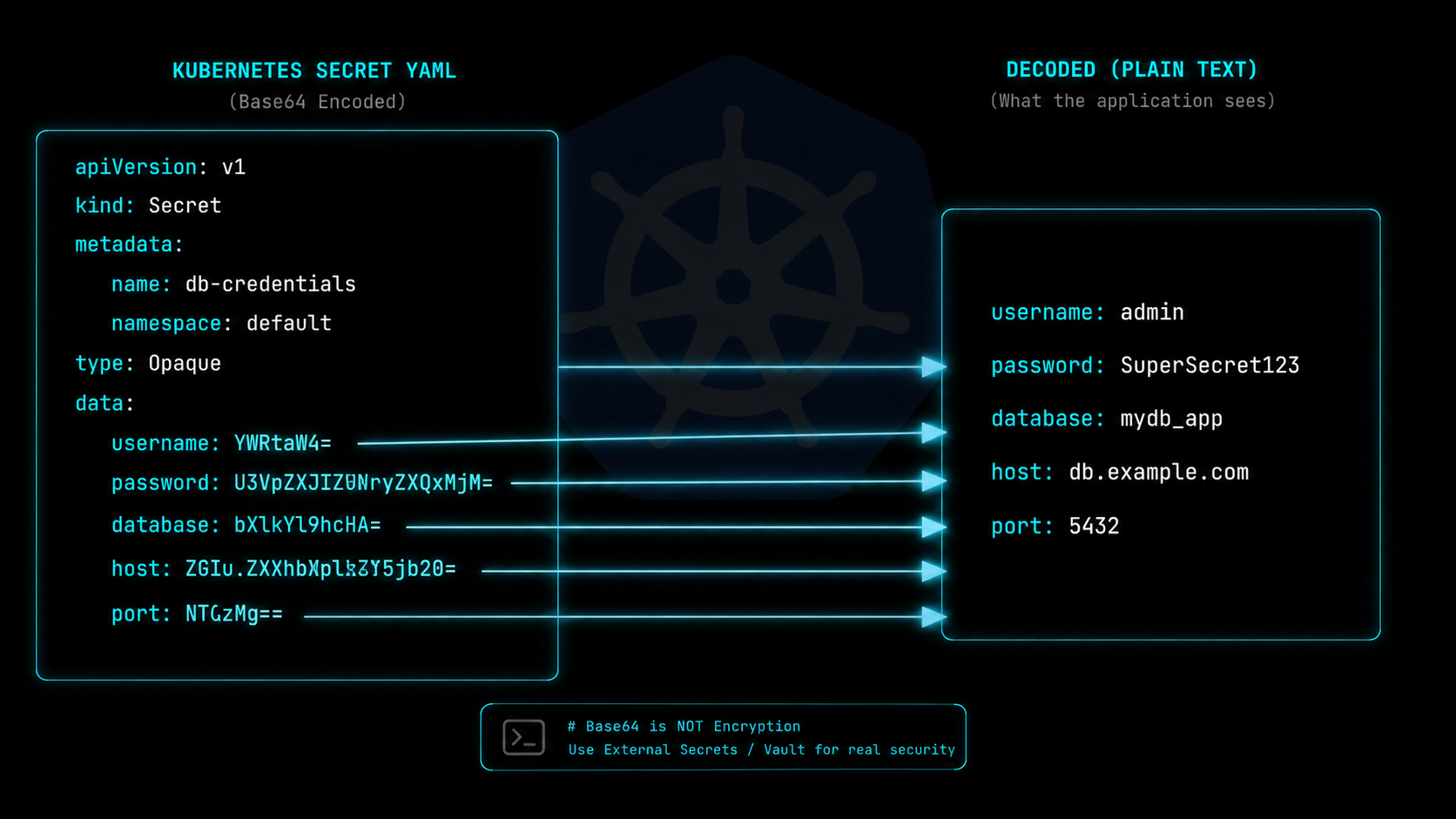
Run kubectl get secret in any Kubernetes cluster and you will see something like this:
data:
  DATABASE_URL: cG9zdGdyZXM6Ly9hZG1pbjpwYXNzd29yZEBkYjo1NDMyL215YXBw
  API_KEY: c2stbGl2ZS1hYmNkZWZnaA==
  JWT_SECRET: bXlzdXBlcnNlY3JldA==
Every value is unreadable. To see what is actually stored you need to decode each one individually. This is not a Kubernetes quirk or an oversight. It is an intentional design decision, and understanding why it works this way makes you significantly better at debugging cluster issues.
What Base64 Actually Is
Base64 is an encoding scheme that converts binary data into a string of printable ASCII characters. It takes any sequence of bytes and represents them using 64 safe characters: uppercase and lowercase letters, digits 0 through 9, plus the plus and slash symbols, with equals signs used for padding.
The critical distinction is between encoding and encryption. Base64 is encoding, not encryption. There is no key. There is no password. There is no secret required to reverse it. Anyone who has the base64 string can decode it in under a second using any programming language or any online tool. It provides zero confidentiality.
Why Kubernetes Uses Base64 for Secret Values
Kubernetes Secrets are designed to store arbitrary binary data. TLS certificates, private keys, authentication tokens, and database connection strings all potentially contain binary bytes that would break YAML serialization if stored as raw strings. A null byte or an unescaped newline inside a YAML value causes a parse error.
Base64 solves this cleanly. Any binary data, regardless of what bytes it contains, becomes a safe printable string that survives YAML serialization without corruption. The trade-off is human readability, but the gain is reliable storage of any data format.
This is why the Kubernetes documentation is explicit about Secrets not being encrypted by default. They are base64 encoded and stored in etcd in plaintext. Any user with kubectl access and the right RBAC permissions can read every Secret in a namespace. Base64 is a transport format, not a security boundary.
The Manual Workflow Nobody Enjoys
Without tooling, decoding a Kubernetes Secret requires running a separate command for each value:
kubectl get secret my-secret -o jsonpath='{.data.DATABASE_URL}' | base64 -dIf your Secret has eight values you run that command eight times, replacing the key name each time. During an incident at 2am this is genuinely painful. During onboarding when you are trying to verify a new deployment has the right credentials it breaks your flow entirely.
The reverse direction is worse. Converting a .env file to a Kubernetes Secret means base64-encoding every value individually:
echo -n "postgres://admin:password@db:5432/myapp" | base64Then manually constructing the YAML, being careful not to include a trailing newline in the encoded value, which changes the output and causes silent authentication failures in your application.
The Silent Trailing Newline Bug
This is the most common Kubernetes Secret mistake and it is worth calling out specifically. When you run echo "myvalue" | base64 the echo command appends a newline character before base64 encodes the string. The encoded output is different from what you get with echo -n "myvalue" | base64, which does not append a newline.
Your application then decodes the Secret value and gets “myvalue\n” instead of “myvalue”. Depending on how your application handles the credential, this extra newline either causes a silent authentication failure or gets trimmed automatically. The inconsistency makes this bug extremely hard to track down because the value looks correct when you read it.
Always use echo -n or printf when encoding values for Kubernetes Secrets manually.
Real Security Practices for Kubernetes Secrets
Since base64 provides no confidentiality, production Kubernetes environments use additional layers to actually protect secret data.
Encryption at rest means configuring the Kubernetes API server to encrypt Secret objects before writing them to etcd. This requires an EncryptionConfiguration file and a key management solution. Without this, anyone who can read etcd directly can read every Secret in your cluster.
Sealed Secrets is a tool from Bitnami that lets you encrypt Secrets using a public key so that only the cluster can decrypt them. You can safely store Sealed Secret YAML files in your git repository because they are encrypted with asymmetric cryptography, not just base64 encoded.
External Secrets Operator integrates Kubernetes with external secret management systems like AWS Secrets Manager, HashiCorp Vault, and Google Secret Manager. Secret values never live in etcd at all. They are fetched from the external system at runtime.
For most teams the practical advice is: use RBAC to strictly limit who can run kubectl get secret, enable audit logging so you know when secrets are accessed, and consider Sealed Secrets or External Secrets Operator for anything that touches production credentials.
Converting Between .env and Kubernetes Secrets
The two most common workflows developers need are decoding an existing Secret to verify its values and encoding a .env file into a new Secret for deployment.
For decoding, you want to paste the entire YAML block and see all values decoded simultaneously rather than one at a time. For encoding, you want to paste a .env file and get back a complete, valid Kubernetes Secret YAML ready to apply with kubectl apply.
The OpsBash Kubernetes Secret Decoder handles both directions in a single browser tool with no installation required. Everything runs client-side so your credentials never leave your machine, which matters for production secrets.
Frequently Asked Questions
Is base64 encoding the same as encrypting?
No. Base64 is encoding, not encryption. It is completely reversible by anyone without any key or password. Never rely on base64 as a security measure.
How do I decode all values in a Secret at once from the command line?
Run kubectl get secret my-secret -o json | python3 -c "import sys,json,base64; d=json.load(sys.stdin)['data']; [print(k+'='+base64.b64decode(v).decode()) for k,v in d.items()]" to decode all values in one command.
Why does my application get authentication errors after I update a Secret?
The most likely cause is a trailing newline in the encoded value. Re-encode using echo -n instead of echo to exclude the newline before base64 encoding.
What is the difference between a Secret and a ConfigMap?
ConfigMaps store non-sensitive configuration data as plain text. Secrets store sensitive data as base64 encoded values. Both are accessible to pods as environment variables or mounted files. The practical difference is access control and intent, not encryption.
How do I rotate a Kubernetes Secret without downtime?
Update the Secret value with kubectl apply, then trigger a rolling restart of the Deployment with kubectl rollout restart deployment your-deployment-name. Kubernetes will gradually replace pods with the new Secret value while keeping the old pods running until the new ones are healthy.