 Buy me a Koffee
Decoding a JWT Is Not Verifying It, and That Distinction Has Caused Real Breaches
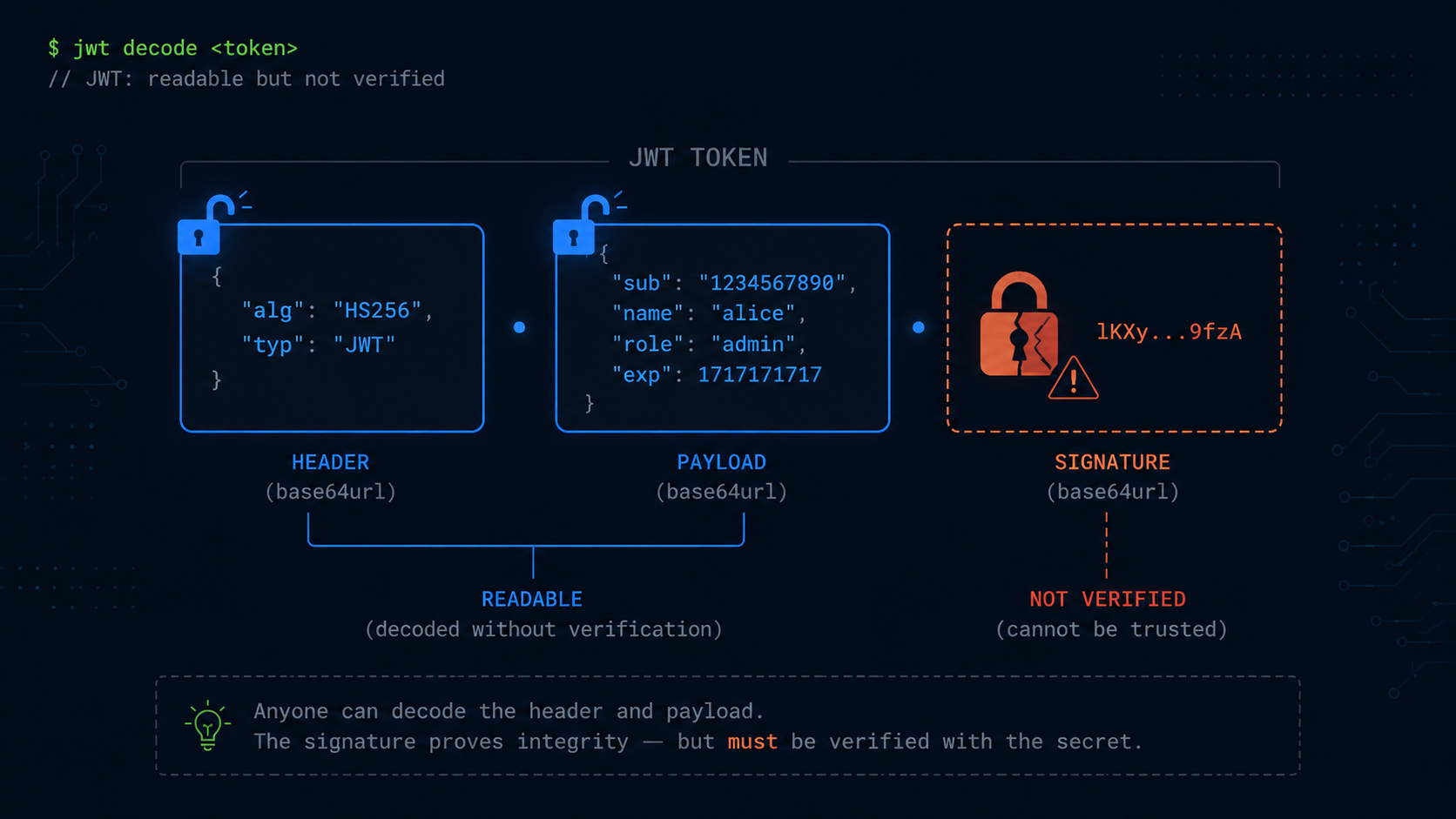
A JWT is three base64url encoded strings joined by dots. You can decode any of them with five lines of code in any language, no secret key required, because nothing inside a JWT is encrypted. The header and payload are just base64 encoded JSON. Anyone holding the token can read every claim inside it.
That’s by design. The part people get wrong is what the signature actually does.
The signature only proves the token wasn’t tampered with after it was issued. It doesn’t hide the contents, and this distinction trips up more developers than it should.
Decoding tells you what a token claims. Verifying tells you whether you can trust those claims. Confusing the two, calling decode where you meant verify, is one of the most consistently exploited mistakes in web security, and it’s still happening in 2026.
The alg none attack, twenty years running
The JWT specification includes an algorithm value called none, meaning literally no signature. Some JWT libraries, particularly older ones or ones used carelessly, will accept a token with “alg”: “none” in its header and skip signature verification entirely.
The attack is almost insultingly simple.
- The attacker gets hold of a legitimate JWT, or doesn’t even need one.
- They base64 decode the header and change “alg”: “RS256” to “alg”: “none”.
- They edit the payload to whatever claims they want, such as “role”: “admin” or “user_id”: “1”, whatever grants access.
- They re-encode both pieces and join them with a trailing dot and an empty signature, producing header.payload.
- If the server’s verification code accepts alg none, this token is treated as valid.
If an attacker crafts a token and sets “alg” to “none”, and your server accepts it without verifying, you’ve handed them admin access.
This isn’t a hypothetical from a security training deck. It’s a documented pattern with a long history. Auth0 had a critical authentication bypass tied to this in 2015. Multiple WordPress plugins were vulnerable to the exact same attack. Countless custom implementations remain vulnerable today.
It’s still happening, a 2026 example
In February 2026, a GitHub issue against a popular LLM proxy project described a JWT signature verification bypass in its internal authentication. The root cause was exactly the decode versus verify confusion.
The code generated JWT tokens properly signed with a master key using HS256, but then decoded them without verifying the signature.
The proof of concept was trivial. Construct a header with “alg”: “none”, build a payload with escalated privileges such as “user_role”: “proxy_admin” instead of a viewer role, join them with an empty signature segment, and submit it:
header = {"alg": "none", "typ": "JWT"}
token = (
    base64.urlsafe_b64encode(json.dumps(header).encode()).decode().rstrip("=")
    + "."
    + base64.urlsafe_b64encode(json.dumps(payload).encode()).decode().rstrip("=")
    + "."
)
The forged JWT token was accepted without any signature verification, granting full administrative privileges, and allowing attackers to impersonate any user.
Same bug, same root cause, eleven years after Auth0’s 2015 incident. The pattern doesn’t go away because the underlying mistake is a single line of code that looks completely reasonable in a code review if nobody is specifically looking for it.
The fix is one parameter
The defense against alg none, and the related algorithm confusion attacks where an RS256 token gets re-signed as HS256, is to never trust the algorithm declared in the token’s own header. Instead, your server should declare which algorithms it accepts and reject everything else.
// DANGEROUS: decodes without verifying anything
const decoded = jwt.decode(token);
if (decoded.userId) {
  // Grants access, but the attacker controls everything in `decoded`
}

// CORRECT: explicitly whitelist algorithms, reject everything else
const decoded = jwt.verify(token, SECRET_KEY, { algorithms: ['HS256'] });
Always specify allowed algorithms to prevent algorithm confusion attacks.
The algorithms array is the whole fix. If none isn’t in that list, and it never should be, a token with alg none fails verification immediately regardless of what’s sitting in the payload.
An audit checklist for your codebase
If you’re not sure whether your service has this problem, here’s what to grep for.
Look for jwt.decode() calls used for authorization decisions. Decoding is fine for reading claims after verification has already happened, such as logging a user ID. It becomes a vulnerability when a decoded value is used to grant access without a preceding verify call.
Check for parseClaimsJwt instead of parseClaimsJws if you’re on Java with JJWT. The missing s is the difference between parsing an unsigned claims object and parsing a signed JWS. One verifies, the other doesn’t.
Look for a missing algorithms parameter in verify calls. If your verify call doesn’t explicitly pass an algorithms allowlist, some libraries will accept whatever algorithm the token claims for itself, including none, or the wrong algorithm family entirely such as HS256 versus RS256 confusion.
Check whether expiry is treated as optional. Decoding a token and trusting the payload without checking exp means a token issued months ago, or one belonging to a revoked session, gets accepted forever.
Add security tests that specifically cover alg none, expired tokens, and tampered payloads. Enable logging for every rejected token and watch for patterns over time.
Try it yourself → JWT Decoder, which lets you paste any token and inspect the payload, headers, and expiry without trusting unverified claims.
A debugging tool is not a verification library
This is also a good moment to be explicit about what a browser based JWT decoder is for, because the line between a tool that helps you debug and a tool that implies security matters here.
The JWT Decoder on opsbash does exactly one thing. It takes the token you paste in, splits it on the dots, base64 decodes the header and payload, and shows you the JSON, including the exp, iat, and nbf claims so you can check at a glance whether a token has expired without writing a script. That’s the entire job. It doesn’t check the signature, because checking the signature requires a key that only your server has, and a tool running in your browser has no business asking for it.
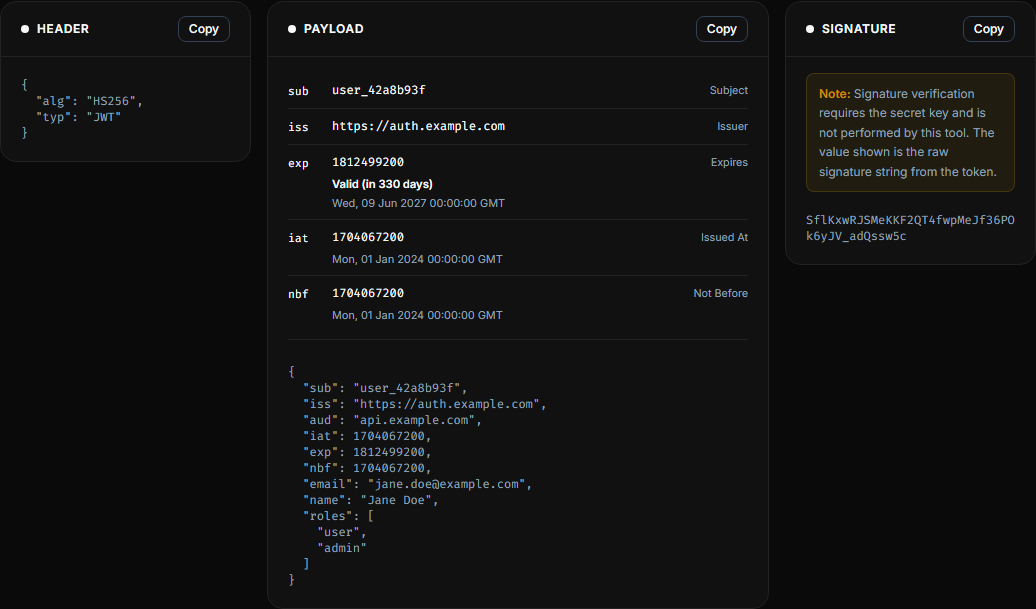
If you’re debugging why a token is being rejected, decode it here to confirm the claims look right, then check your server’s verification logic, specifically the algorithms allowlist, for the actual answer. Decoding shows you what the token says. It was never going to tell you whether to trust it, and neither should your authorization code.