 Buy me a Koffee
The .gitignore Patterns That Don’t Do What You Think (Negation, Wildcards, and Directory Slashes)
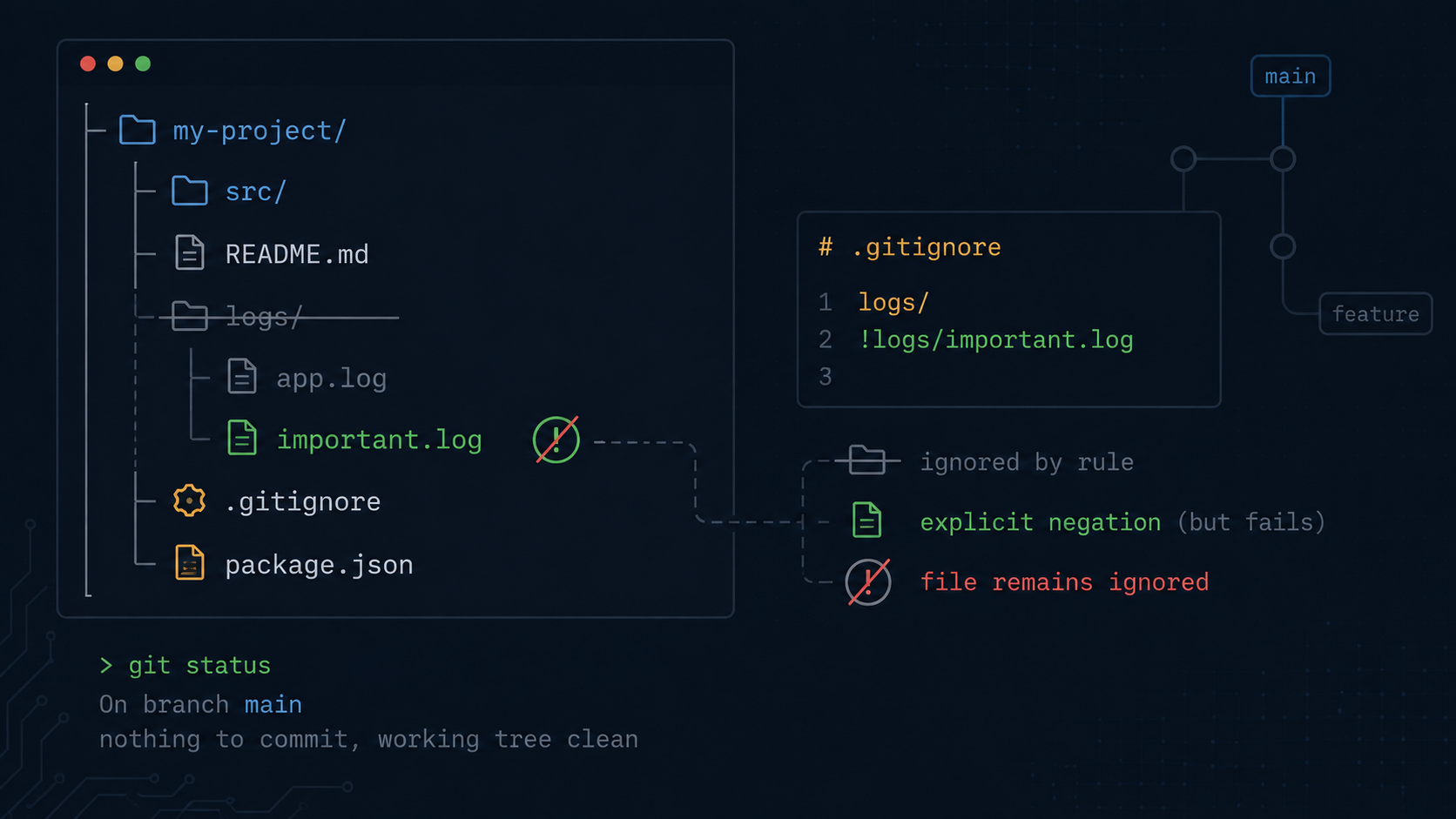
You ignore an entire logs directory because it’s full of noise. Then one file in there, logs/important.log, actually matters, and you want Git to track it. So you add this:
logs/
!logs/important.log
And Git ignores your exception completely. important.log stays untracked, git status doesn’t show it, and running git add on it either fails silently or does nothing useful. You didn’t make a typo. This is .gitignore working exactly as designed, and the design is the part nobody explains.
Why negation inside an ignored directory doesn’t work
The Git documentation states the rule plainly, but it’s easy to skim past.
It is not possible to re include a file if a parent directory of that file is excluded.
Once logs/ is excluded, Git doesn’t even look inside it to evaluate further patterns. The negation pattern for logs/important.log is never reached, because Git already decided the entire directory is out of scope. Negation patterns only work to carve exceptions out of file level exclusions, not directory level ones.
The fix depends on what you actually want.
If you want to ignore most files in a directory but keep a few, ignore the files individually rather than the directory:
logs/*
!logs/important.log
This works because logs/* excludes the contents of the directory file by file, not the directory itself, so Git still descends into logs/ to evaluate the negation.
If you need this nested deeper, you may have to re include the intermediate directories too:
logs/*
!logs/keep/
!logs/keep/**
The mental model is that negation can un exclude a file that an earlier pattern excluded, but it cannot un exclude something inside a directory that was itself excluded, because Git stops traversing before it gets there.
The leading slash: anchored versus anywhere
Per the Git docs, the pattern hello.* matches any file or directory whose name begins with hello., and if you want to restrict that to one specific directory rather than every subdirectory, you prepend the pattern with a slash.
Without a leading slash, a pattern matches at any depth. build/ ignores every directory named build, anywhere in your repo, including build/, src/build/, and packages/api/build/.
With a leading slash, the pattern becomes anchored to the location of the .gitignore file, which is usually the repo root.
/build/This ignores build/ at the root only. A src/build/ directory would not be ignored by this pattern. You’d need a separate rule or a non anchored pattern for that.
This distinction matters most when you’re writing a .gitignore for a monorepo or any project with nested directories that share names. node_modules, dist, build, and target are common offenders. If you mean “ignore this everywhere,” don’t anchor it. If you mean “ignore this one specific directory,” anchor it with a leading slash, or you’ll accidentally ignore something with the same name three levels deep that you actually wanted tracked.
The trailing slash: directory only versus file or directory
This one flips the previous rule. A trailing slash restricts a pattern to directories only.
configThis matches a file named config or a directory named config.
config/This matches only a directory named config. If you have a file called config, with no extension, sitting in your repo root, the trailing slash version won’t touch it. Only a directory by that name gets ignored.
This rule explains the classic “why is my dist file, not folder, still showing up in git status” confusion. If your .gitignore has dist/ and your build occasionally emits a flat file called dist instead of a directory, which some bundlers do conditionally, the trailing slash means that file is never matched.
Single asterisk versus double asterisk: single level versus arbitrary depth
A single asterisk matches any sequence of characters except a slash, which means it’s confined to one path segment.
*.logThis matches app.log, logs/app.log, and src/debug/error.log. The asterisk here doesn’t care about depth because there’s no slash in the pattern at all, so it’s evaluated at every directory level independently.
But once you introduce a slash into the pattern, the single asterisk becomes depth limited.
src/*.logThis matches src/app.log. It does not match src/debug/app.log, because the asterisk won’t cross the slash between debug and the filename.
A double asterisk is the escape hatch for “any number of directories, including zero.”
src/**/app.logThis matches src/app.log, src/debug/app.log, and src/debug/nested/app.log, because the double asterisk expands to match zero or more full path segments.
The practical failure mode is that someone writes src/*.log expecting it to catch every log file anywhere under src/. It works in their flat test directory, ships, and six months later a log file two directories deeper shows up in a diff because the single asterisk never crossed that slash boundary. A double asterisk is the pattern that actually means “anywhere under here.”
A quick reference
| Pattern | Matches | Doesn’t match |
|---|---|---|
| build | build file or directory, at any depth | |
| /build | build file or directory, root only | src/build |
| build/ | build directory, any depth | a file named build |
| *.log | any .log file, any depth | |
| src/*.log | .log files directly in src/ | src/debug/x.log |
| src/**/*.log | .log files anywhere under src/ | files outside src/ |
| logs/ then !logs/x.log | nothing extra, negation doesn’t apply | logs/x.log stays ignored |
| logs/* then !logs/x.log | logs/x.log is un ignored | other files in logs/ stay ignored |
Stop hand rolling these
Every one of these rules is individually documented, and every one of them is easy to get subtly wrong under the assumption that .gitignore syntax is basically glob patterns and can’t be that hard. The negation inside an excluded directory rule especially has no error message and no warning. It just quietly does nothing, and you find out three weeks later when a file you thought was excluded shows up in a pull request diff.
The gitignore Generator on opsbash builds tech stack specific .gitignore files using patterns that are already known to work, including the file level exclusion plus negation pattern for the “ignore a directory except one file” case. If you’re hitting one of the gotchas above on an existing .gitignore, it’s also a good sanity check to regenerate the relevant section and compare it against what you wrote by hand.
Try it yourself → Gitignore Generator, which lets you generate a stack-specific .gitignore with correct wildcard and negation patterns for any technology stack.