 Buy me a Koffee
AWS EventBridge Cron Isn’t Unix Cron: Here’s Where It Breaks
You’ve written 0 9 * * 1-5 a thousand times. It means 9am UTC, Monday through Friday, and every Unix system on the planet understands it. You paste it into an EventBridge rule, hit save, and get this back:
ValidationException: Parameter ScheduleExpression is not valid.No line number. No hint about which character is wrong. Welcome to AWS’s cron dialect, which looks like Unix cron, was clearly inspired by Unix cron, and is absolutely not Unix cron.
The first difference: six fields, not five
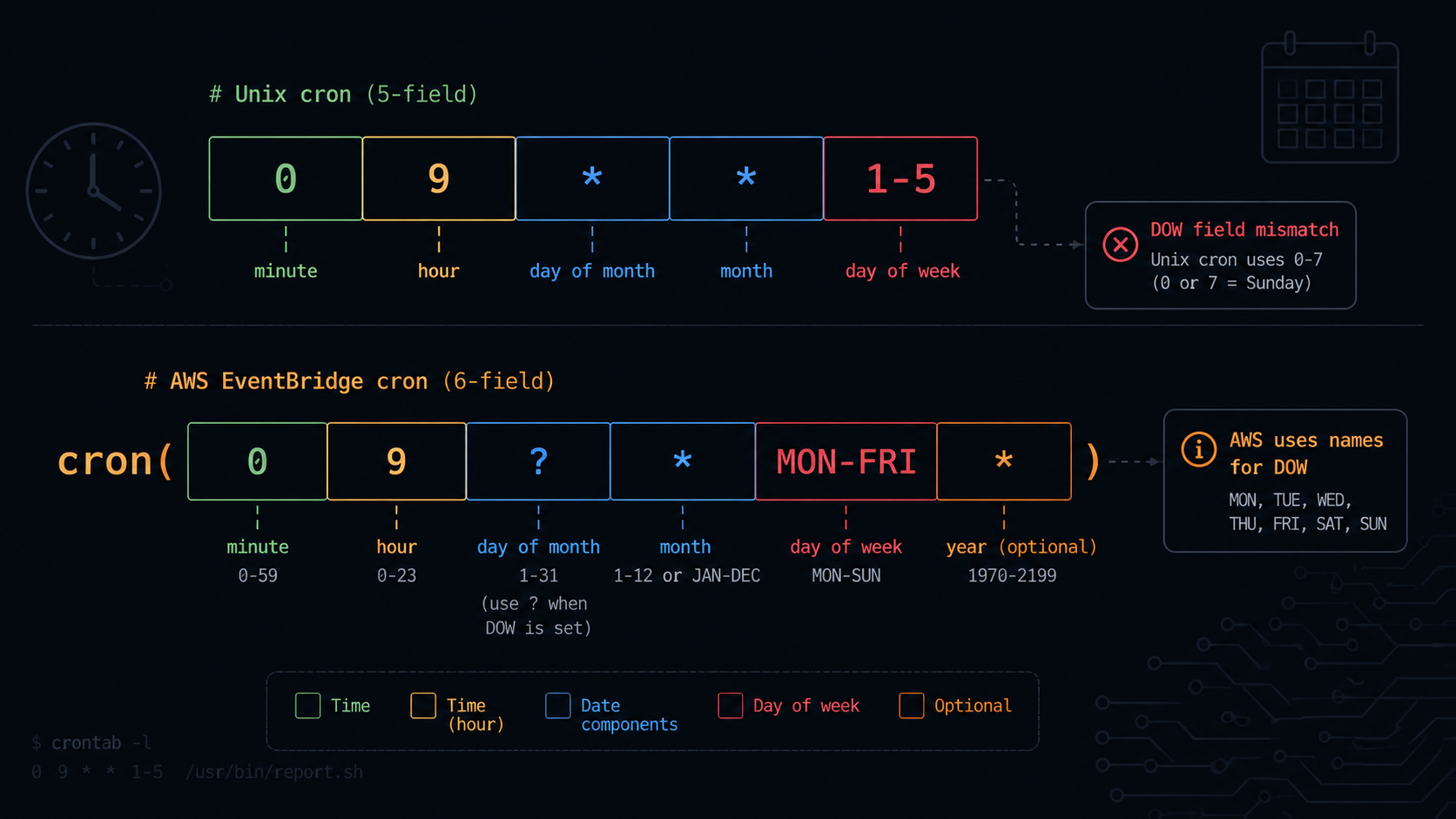
Unix cron has five fields: minute, hour, day of month, month, and day of week. EventBridge tacks on a sixth.
cron(minute hour day-of-month month day-of-week year)That trailing year field is mandatory. Leave it off and you’ll hit the same validation error with zero explanation about what’s missing. The valid range runs from 1970 to 2199, though in practice you’ll almost always type *.
So the “same” schedule, 9am UTC on weekdays, becomes:
cron(0 9 ? * MON-FRI *)Notice two more things changed beyond just adding a field. We’ll get to both of them.
The second difference: you can’t use an asterisk in both day fields
This is the rule that catches engineers who already know EventBridge needs six fields, because it isn’t about field count at all. It’s about a mutual exclusion AWS enforces between the day of month field and the day of week field.
You can’t use an asterisk in both the day of month and day of week fields. If you use it in one, you must use a question mark in the other.
Why does this exist? Because “every day of the month and every day of the week” is redundant. Cron only needs one axis to mean “every day,” so AWS forces you to be explicit about which axis is doing the work. The question mark means “I don’t care about this field, the other one is driving the schedule.”
So cron(0 9 * * 1-5 *), which looks like a perfectly reasonable port of the Unix expression, is invalid. It has an asterisk in day of month and a value in day of week with no question mark anywhere. The correct version is:
cron(0 9 ? * MON-FRI *)Day of month is set to ? since day of week is handling the filtering, and day of week carries MON-FRI.
Flip it around for “run on the 15th of every month, I don’t care what day that falls on”:
cron(0 9 15 * ? *)Now day of month carries the value and day of week becomes ?.
The rule in one sentence: exactly one of day of month or day of week must be ?, and it’s whichever field you aren’t using to filter.
The third difference: day of week numbering doesn’t match Unix, and this one won’t throw an error
This is the dangerous one, because it doesn’t trigger a validation exception. It validates fine, deploys fine, and quietly runs on the wrong day.
In Unix cron, day of week runs from 0 to 6 (sometimes 0 to 7), with both 0 and 7 meaning Sunday. EventBridge shifts that whole scale.
EventBridge cron day of week runs from 1 to 7, with 1 representing Sunday, which is different from Unix.
So if you’ve got a Unix cron job using day of week value 1 (meaning Monday in Unix), and you port the literal digit 1 straight into EventBridge, you’ve just scheduled the job for Sunday. There’s no error. No warning. Your “Monday morning report” now fires a day early, and unless someone is specifically comparing timestamps, this can run for months before anyone catches it.
The fix is simple but easy to forget under deadline pressure. Use the three letter day names (MON, TUE, WED and so on) instead of numbers whenever you’re porting a Unix expression. Names sidestep the numbering mismatch entirely. If you have to use numbers, just remember that EventBridge’s 1 is Sunday, not Monday.
The fourth difference: UTC only, no time zone field for the older service
EventBridge Rules, the original and more widely used service, runs cron expressions in UTC exclusively. There’s no timeZone field. If your business logic says “run at 9am Eastern,” you’re doing the daylight saving math yourself, twice a year, forever, or accepting that the job drifts by an hour every spring and fall.
There’s a better option if you’re starting fresh: EventBridge Scheduler. This is a separate, newer service that supports time zone aware schedules natively. You specify the IANA time zone and it handles the daylight saving transitions for you. If you’re stuck on EventBridge Rules for legacy reasons, the usual workaround is the same one Kubernetes teams reach for: schedule in UTC and accept the seasonal hour shift, or maintain two rules and toggle which one is enabled, which is exactly as fragile as it sounds.
Four expressions that look valid and aren’t
A quick reference for the errors you’ll actually run into:
| Expression | Looks like it means | What happens |
|---|---|---|
cron(0 9 * * 1-5) | 9am weekdays | Invalid. Only 5 fields, missing the year |
cron(0 9 * * 1-5 *) | 9am weekdays | Invalid. Asterisk in both day fields with no question mark |
cron(0 9 ? * 1-5 *) | 9am Monday through Friday | Valid but wrong days. 1-5 is Sunday through Thursday in EventBridge, not Monday through Friday |
cron(0 9 ? * MON-FRI *) | 9am Monday through Friday | Correct |
That third row is the one that costs you a debugging session three weeks later.
A field by field comparison you’ll need more than once
| Unix cron | EventBridge cron() | EventBridge Scheduler | GitHub Actions | |
|---|---|---|---|---|
| Fields | 5 | 6 | 5 plus optional year | 5 |
| Day of week range | 0 to 7, with 0 and 7 meaning Sunday | 1 to 7, with 1 meaning Sunday | 1 to 7, with 1 meaning Sunday | 0 to 6, with 0 meaning Sunday |
| Asterisk in both day fields | Allowed | Forbidden, use a question mark | Forbidden, use a question mark | Allowed |
| Time zone | System default | UTC only | Configurable IANA time zone | UTC only |
| Special characters | None standard | ?, L, W, # | ?, L, W, # | None |
If you’re maintaining schedules across Kubernetes CronJobs, EventBridge, and GitHub Actions, you’re juggling three dialects with three failure modes. One throws an error. One silently shifts your schedule by a day. One just runs in UTC and trusts you did the offset math correctly.
Stop counting fields by hand
This is exactly the kind of task that’s tedious to get right manually and quietly damaging to get wrong. The Cron Builder on opsbash has a dedicated EventBridge output mode. Pick your schedule visually, and it generates the correct six field expression with the question mark placement and day names handled for you, so you’re not relying on remembering that 1 means Sunday at 11pm on a Friday.
It also outputs the equivalent Kubernetes CronJob, GitHub Actions, and standard Unix cron syntax side by side, so if you’re maintaining the same schedule across multiple platforms, you can see all four dialects at once instead of translating between them in your head.
Try it yourself → Cron Expression Builder, which lets you generate EventBridge-compatible cron syntax with automatic field validation across Linux, AWS, Kubernetes, and GitHub Actions.