 Buy me a Koffee
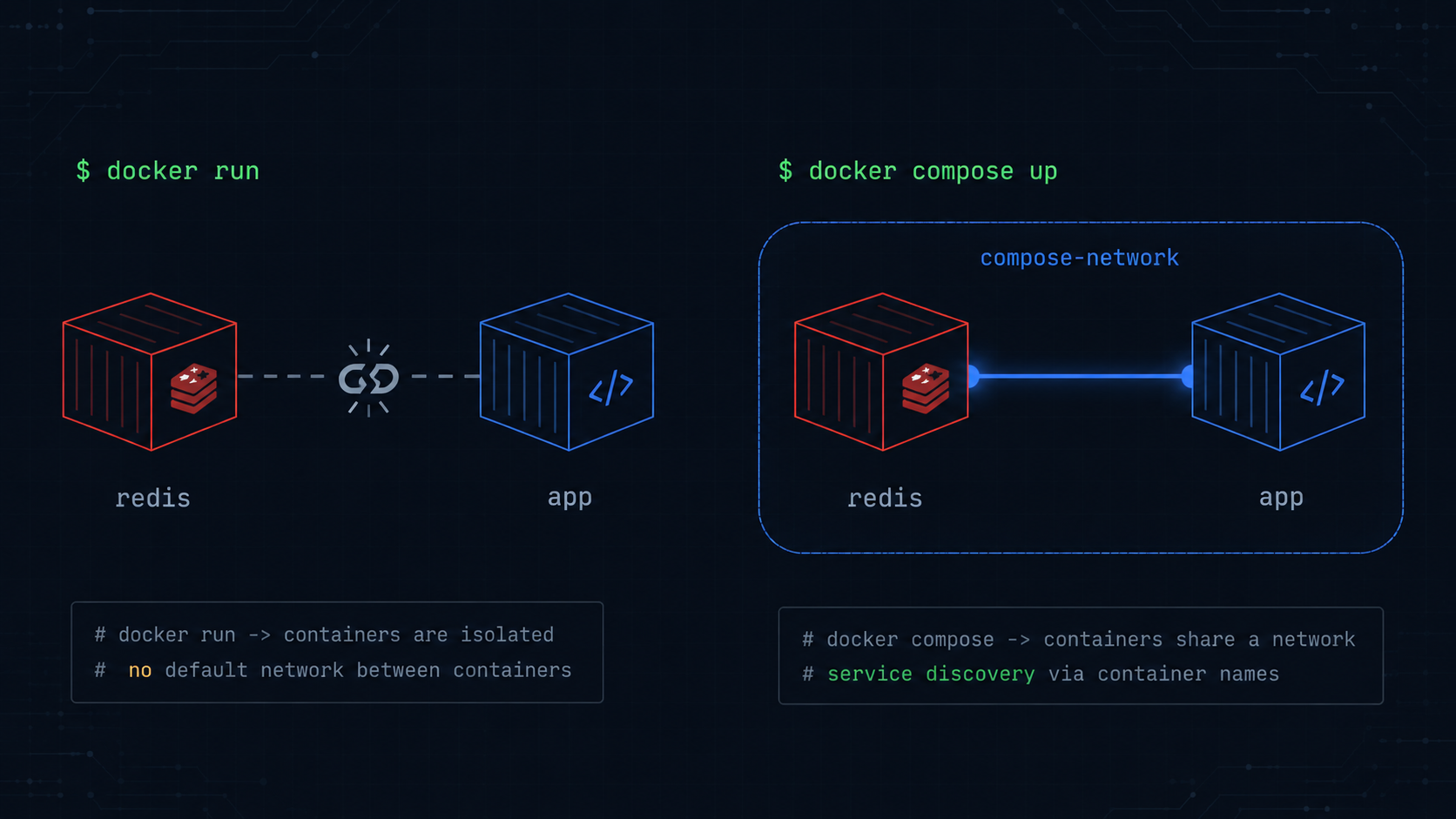
Why Your docker run Command Works But the Equivalent Compose File Doesn’t
You’ve got a working setup. Two docker run commands, a custom network connecting them, everything talks to everything. Time to convert it to Compose, which sounds like a syntax exercise. Take each flag, find its YAML equivalent, done.
Except the containers can’t find each other anymore. The app throws something like redis: getaddrinfo ENOTFOUND redis. The app container can’t resolve a hostname that worked fine in the docker run version. Nothing about the flags was translated incorrectly. The problem is that flag by flag translation isn’t actually how Compose’s networking model works, and the piece that got lost wasn’t a flag at all.
What the docker run version actually relied on
Say your working setup looks like this:
docker network create first-network

docker run -d --name redis-test --network first-network \
  -e REDIS_PASSWORD=secret \
  bitnami/redis:latest

docker run -d --name my-app --network first-network \
  -e HOST=redis-test \
  -p 8080:8080 \
  first-image
This works because both containers are explicitly placed on first-network, a user defined bridge network you created yourself. Docker’s embedded DNS server resolves container names to IPs only for containers on the same user defined network, so my-app can reach redis-test by name because you put both of them there on purpose, with an explicit docker network create step.
That docker network create step is the part that’s easy to drop when translating, because it doesn’t look like a flag on either docker run command. It’s a separate, prerequisite command that already ran before either container started.
The naive Compose translation
If you go flag by flag, you might end up with something like this:
services:
  redis:
    image: bitnami/redis:latest
    environment:
      - REDIS_PASSWORD=secret

  app:
    build: .
    environment:
      - HOST=redis-test
    ports:
      - "8080:8080"
    depends_on:
      - redis
This looks complete. Every environment variable and port from the docker run commands is represented. It might even seem like it should work, because Compose creates a default network for all services in the file automatically, and services on that default network can resolve each other by their service name. So HOST=redis-test should work, right? Here’s the actual bug.
In the docker run version, the container was named —name redis-test, so HOST=redis-test resolved through Docker’s DNS to that container. In the Compose version, the service is named redis, not redis-test. Compose’s DNS resolves by service name, and nothing in this file is named redis-test. The environment variable HOST=redis-test now points at a hostname that doesn’t exist in this network at all.
This is the trap. The translation was syntactically faithful. Every flag has a YAML equivalent. But the names that the networking model resolves by changed from container names to service names, and an environment variable that encoded one of those names never got updated to match.
The corrected version
services:
  redis:
    image: bitnami/redis:latest
    container_name: redis-test
    environment:
      - REDIS_PASSWORD=secret
    networks:
      - first-network

  app:
    build: .
    environment:
      - HOST=redis-test
    ports:
      - "8080:8080"
    depends_on:
      - redis
    networks:
      - first-network

networks:
  first-network:
Two changes fixed it.
The first is adding container_name: redis-test. If you need the container to be reachable by a specific name, because something such as an env var, a config file, or an external script already references that name, Compose lets you pin it explicitly. Otherwise, update HOST=redis-test to HOST=redis to match the service name instead, which is the more idiomatic Compose approach.
The second is the explicit networks block. This isn’t strictly required, since Compose’s default network would have let app and redis talk to each other by service name regardless, but it matters once you have more than one Compose file, or services that should be isolated from each other, or you’re integrating with containers started outside this Compose file through docker run, which is exactly the migration scenario this post is about.
The general pattern: Compose has an implicit topology you have to make explicit or accept
The deeper point is that docker run requires you to set up networking as discrete, visible steps. You run docker network create, then pass —network on each container. Every piece of the topology is a command you typed. Compose, by contrast, has sensible defaults that handle most of this for you, which is great until your migration depends on a detail, such as a specific container name, a specific network, or a port published a specific way, that the defaults don’t replicate.
| docker run flag | Naive Compose translation | What’s actually different |
|---|---|---|
| —name redis-test | often dropped, service name is used instead | Service name (redis) is what Compose DNS resolves. container_name is a separate, optional pin. Anything referencing the old container name by string needs updating or an explicit container_name. |
| —network first-network | networks: [first-network] per service, or omitted entirely | Compose’s default network already provides service name DNS resolution. Explicit networks matter for isolation or integration with non Compose containers, not for basic discovery. |
| -v ./data:/app/data | volumes: [”./data:/app/data”] | Same syntax, but see below. -v can mean three different things. |
| —restart unless-stopped | restart: unless-stopped | Direct equivalent, but Compose’s default with no restart key is “no,” meaning don’t restart, the same as docker run’s default. It’s easy to assume Compose restarts things by default. It doesn’t. |
| -e HOST=container-name | environment: [HOST=container-name] | The value may need updating if it references a container name that changed to a service name during translation. |
A note on -v, since it’s the other common translation trap
While we’re here, docker run -v accepts three structurally similar but behaviorally different things: a host bind mount path, a named volume, or, if you omit the host side entirely, an anonymous volume. All three can appear as volumes entries in Compose with nearly identical looking syntax, but they have very different persistence behavior. An anonymous volume translated incorrectly can mean your data silently doesn’t persist across docker compose down the way it did with docker run, because the volume that was implicitly created and reused under docker run isn’t the same volume Compose creates by default. If your translated stack loses data on restart when the docker run version didn’t, this is the first place to look.
Translate the topology, not just the flags
The fastest way to avoid this category of bug is to not hand translate flag by flag in the first place. The Docker Run to Compose tool on opsbash takes your actual docker run commands, including the —network, —name, and -v flags, and generates a docker-compose.yml that preserves the topology, not just a line for line flag mapping. It handles the service name versus container name distinction and the volume type detection for bind mounts, named volumes, and anonymous volumes, so the translated file behaves the same way the original commands did, including the parts that worked only because of an implicit step like docker network create that doesn’t have an obvious YAML equivalent at all.
It also converts in the other direction. If you’ve got a docker-compose.yml and need the equivalent docker run commands for a script or a one off debugging session, the same tool handles that with the same topology aware translation.
Try it yourself → JSON↔YAML Converter, which lets you convert between JSON and YAML instantly in your browser, no uploads, no account needed.